
Task Guide 2
Account and Sign In
Create an account to save base layouts and track war defenses.
An account gives you access to My Bases and the Defense Ledger.
1
2
3
4
5
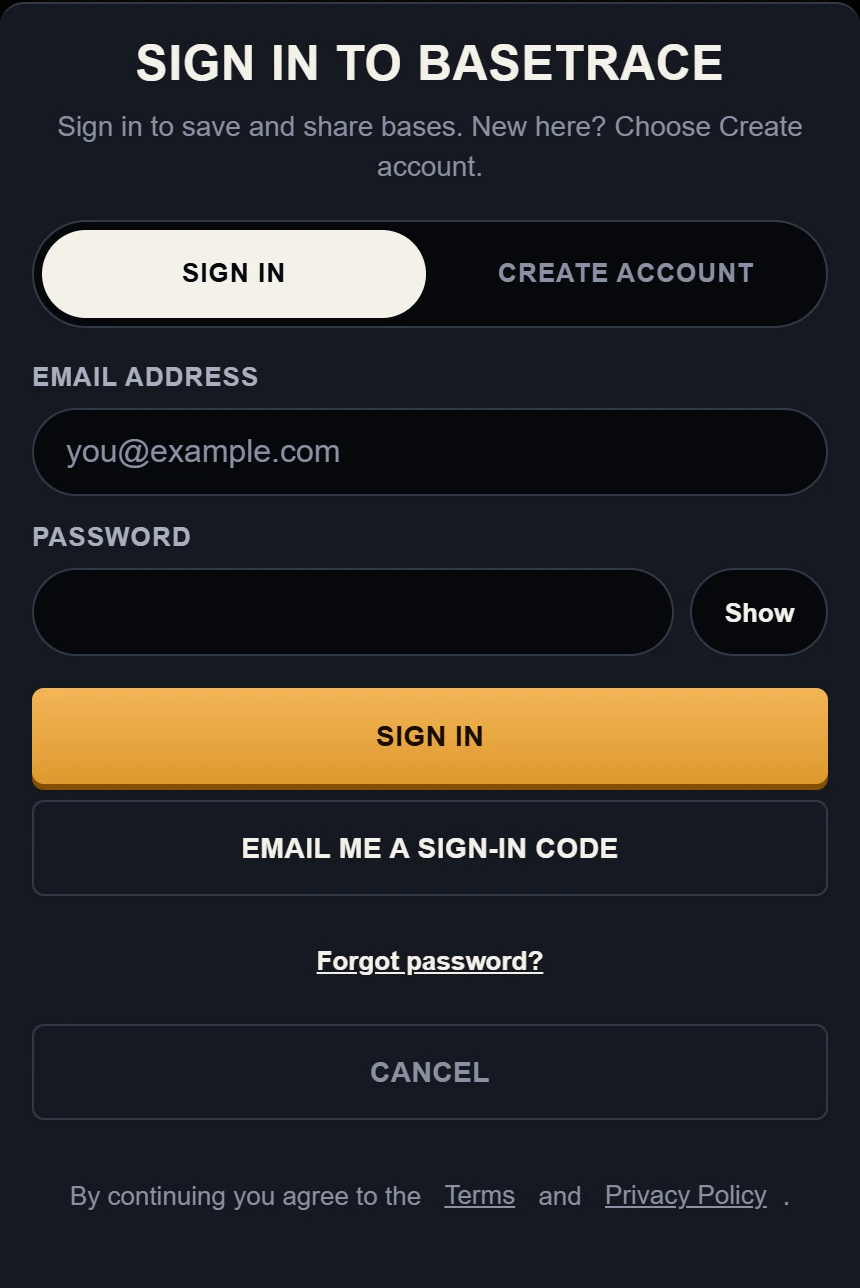
1 Create account: switch to the new account tab.
2 Email address: type your email here.
3 Password: type your password here.
4 Email me a sign-in code: sign in without a password.
5 Forgot password?: sends a reset link.
Example data. The sign in dialog at phone width, with both account tabs and the passwordless option.
Steps to Sign In or Create an Account
Step 1
Open the sign in dialog
Tap Sign in in the top navigation bar.
You should see: The sign in modal appears over your screen.
Step 2
Choose your account action
If you are new, tap Create account. If you already have an account, stay on the Sign in tab.
Enter your email and password.
Tap Create account or Sign in.
After you create an account, check your email and confirm it.
You should see: The tab you chose is highlighted.
Step 3
Sign in with a code
Do you prefer not to type a password? Tap Email me a sign-in code. Check your inbox for the 6-digit code, then enter it.
You should see: A field for the 6-digit code.
If it does not work: Check your email spam folder. If the code does not arrive, tap Resend Code.
Step 4
Reset password when needed
If you cannot remember your password, enter your email address and tap Forgot password?. We email you a reset link.
You should see: A confirmation message telling you to check your email.