
Card Status and Appeals
Learn what each card state means, read review notes, and see when an appeal is allowed.
A published card starts as Pending and appears after a moderator approves it.
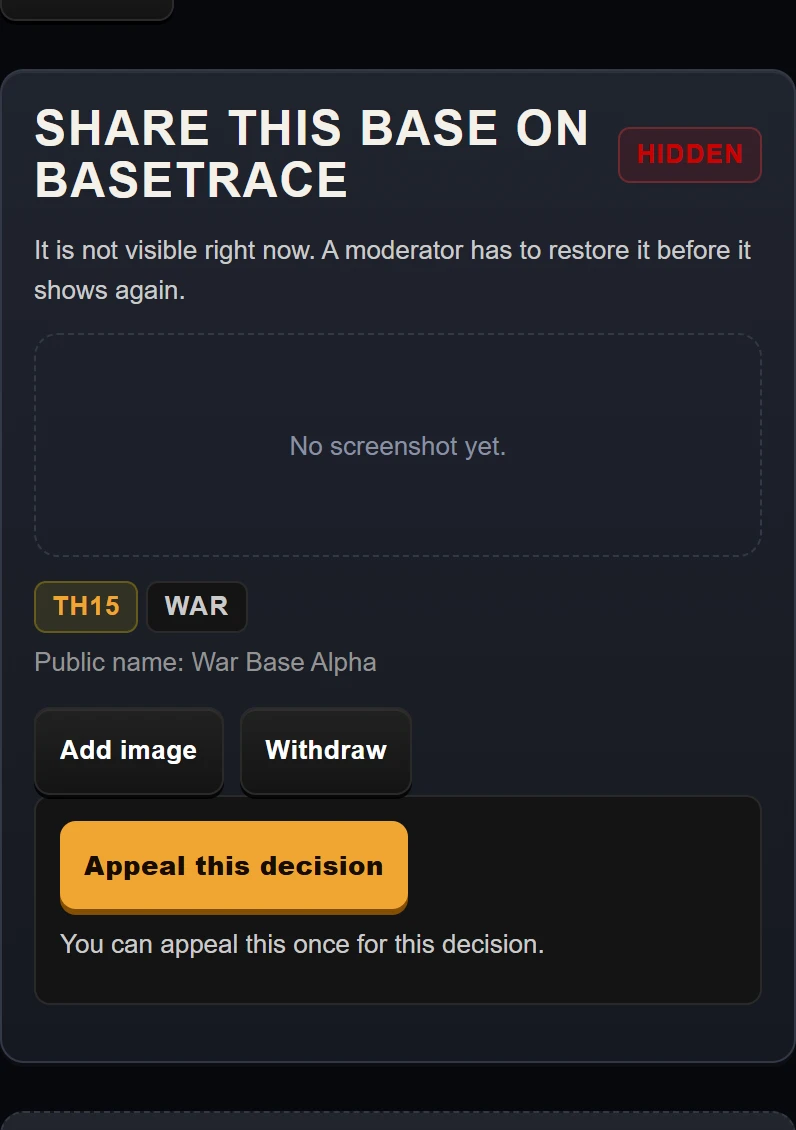
Example data. A card hidden by a moderator, with its appeal button at phone width.
The Card States
Pending
The card is in the review queue. A moderator checks that player names, clan names, tags, and chat lines have been removed.
Approved
The card passed moderation and is shown in the public gallery. Visitors can browse it and copy its layout link.
Rejected
The moderator turned the card down. The moderator note explains the problem. A rejected card cannot be appealed; fix the problem and publish it again.
Hidden, Removed, or Withdrawn
Hidden by a moderator means the card is not shown to other players until a moderator restores it. It can be appealed once for that decision.
Removed means a moderator removed the card. This is final: it cannot be appealed and cannot be published again. The owner can add a new base instead.
Withdrawn means the owner delisted a published card. It is not shown to other players, and the owner can publish it again later.
Report a card
Open a card and tap Report. Pick a reason.
- Shows personal info (names / tags / clan).
- Not a base layout.
- The link does not match the image.
- Someone else made this.
- Offensive name or text.
- Spam or advertising.
- Something else.
Tap Send report. Reports go to the moderation queue for human review.
How to Appeal a Decision
Submit an appeal
An Appeal this decision button appears only for a hidden card. It does not appear for a removed card, a rejected card, or a card you withdrew yourself.
Tap Send appeal. You can send one appeal per decision. The text must be 10 to 1000 characters. A moderator then restores the card or keeps it hidden.