
How to Publish a Base
Share your base with the Clash of Clans community while protecting clan war privacy.
A published card appears in the gallery with its copy link and, if you add one, its approved screenshot. You do not need a verified player to publish a base. A card shows a hold rate only after attacks on your verified account are saved against this base. See how a base gets its hold rate.
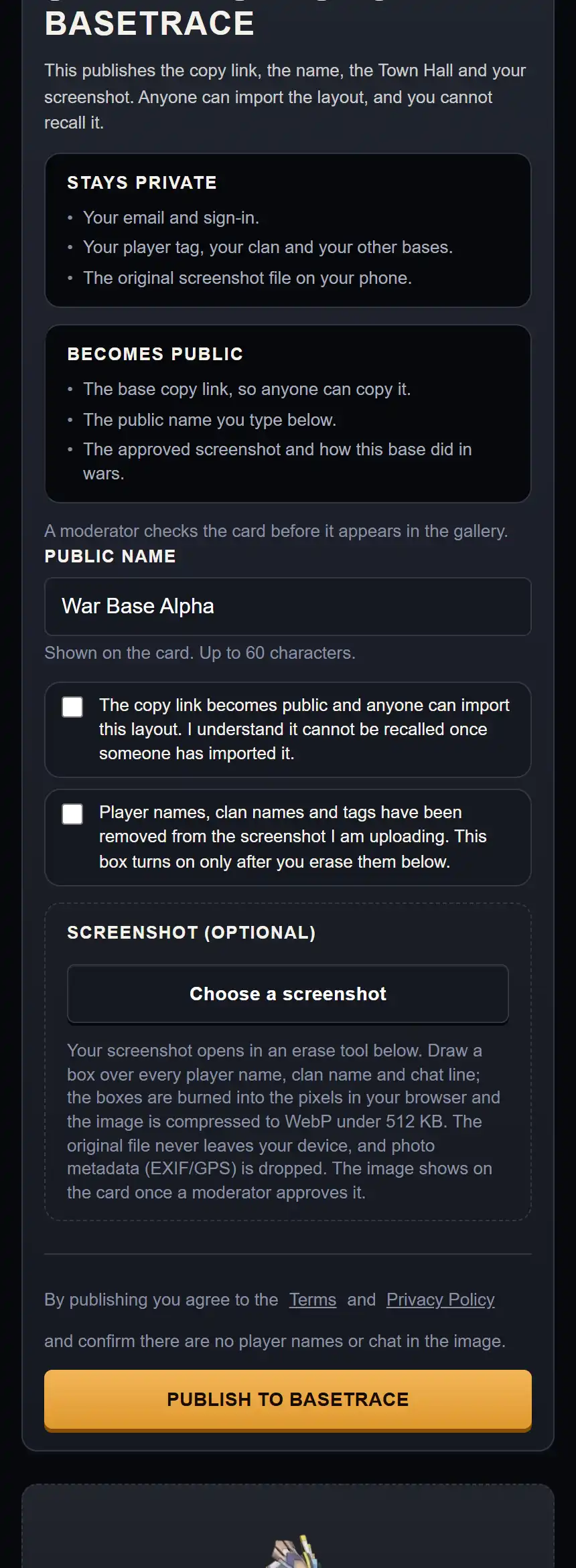
Example data. The publish panel at phone width, with both consent rows above the publish button.
Steps to Publish Your Base
Open your base in My Bases
In My Bases, tap on the base you want to share. Scroll down to the Share this base on BaseTrace section.
Set a public display name
In the Public name field, enter a name for the public card. The field has a maximum length of 60 characters. Example: Anti-3 Star Ring.
Erase all player and clan names
If you attach a screenshot, remove all player tags, village names, clan names and chat lines. In the erase tool, drag a box over anything that identifies you, then tap Done.
Check the consent boxes
Tick the copy-link consent box, then tick the names-removed box. If you attach a screenshot, erase names before ticking it. The names-removed box is required even when you do not attach a screenshot.
Submit for moderation
Tap Publish to BaseTrace. A moderator checks the card before it appears in the gallery.
Active War Warning
The product shows this warning: This base is your active war or CWL base. Opponents who find the card can practise against it while your war is live. The button is Publish anyway.